Your travel itinerary is lying to you
By Sébastien Arbogast, founder of Skaoot · Last updatedThree weeks ago, the airline moved your flight. The new departure is two and a half hours later, which quietly breaks the connection you booked on a separate ticket. They emailed you about it. The email landed under a marketing blast and a receipt you’d already filed, and you never opened it.
Your itinerary, the one you’ll actually look at on the morning of the flight, still shows the old time. And it shows it with total confidence. No asterisk, no warning, no hint that it’s describing a flight that no longer exists.
That’s the quiet danger of a flight schedule change. The problem isn’t that it happens. The problem is that your records keep insisting on the old reality while looking exactly as trustworthy as ever. This post is about why that gap opens up, a practical system to close it by hand, and how to stop being the thing that has to reconcile the two.
Why your itinerary drifts away from reality
When you book a flight, you get a confirmation email, and that becomes your mental “source of truth.” The problem is that the confirmation is a snapshot of one moment, and flights move after you book them. Airlines retime flights for crew scheduling, aircraft swaps, seasonal timetables, and slot changes, constantly, and often months out.
When they do, the update almost never arrives as a tidy correction to the original. It comes as a fresh email, with a new subject line, a new reference, and frequently a different sender than the one you booked through. To you it looks like just another message in the pile. To any system organized by “the original confirmation,” it looks like something unrelated.
So three things have to happen for your records to stay true: the change email has to reach you, you have to notice it, and you (or your tool) have to connect it back to the right flight. Miss any one of those and your itinerary keeps showing the old time. The phrase travelers use for the worst version of this is grim and accurate: “I didn’t get the rebooking email.” Often it was sent. It just never closed the loop.
A wrong itinerary is worse than no itinerary
If you had no itinerary at all, you’d know to check. The trap with a silently-outdated one is that it removes the prompt to check. It answers “when’s my flight?” instantly and incorrectly, and you act on the answer. You book a taxi for the old time, tell your connection’s airline you’ll make it, plan your last morning around a departure that already moved.
A schedule change you catch is a minor annoyance. A schedule change you catch at the airport is a missed flight, a blown connection, and a fare-rules argument at a service desk. The entire game is moving the moment of discovery as early as possible.
The four ways a schedule change sneaks past you
It helps to know the specific failure modes, because a good system has to survive all of them.
- The buried email. The change arrives and gets lost in inbox noise. The most common case, and the simplest in principle: you just never saw it.
- The partial-info notification. Some changes, a gate move, a terminal switch, a “your flight has been updated” nudge, arrive with almost no detail. No flight number, no date, sometimes nothing but “tap here.” Even if you see it, it doesn’t tell you enough to update your records.
- The duplicate. If you use an itinerary tool, many of them read the change email as a brand-new booking and create a second trip. Now you have two: the original with the wrong time, and a new one with no return leg and no context. Which one’s right? You’re back to checking by hand.
- The silent rejection. Other tools do the opposite. They can’t match the change to anything, so they discard it. No duplicate, but no update either. Your itinerary stays wrong and nothing tells you.
The manual system to catch them
Most advice on this stops at “monitor your bookings,” which isn’t a system, it’s a wish. Here’s an actual routine. It’s a little work, but it’s reliable if you keep to it.
Reconfirm at the source, not from your records. This is the core habit. A day or two before each flight, and for long-haul or tight itineraries again the week before, check the flight directly in the airline’s app or website, by pulling it up from your booking reference. The whole point is to compare against the airline’s live record, not against your own saved copy, because your saved copy is the thing that might be lying.
Check connections as their own risk. If you’re self-transferring (separate tickets, not a single protected booking), a schedule change to leg one is exactly what collapses the connection. Reconfirm both legs and re-check that the gap between them still works. A change that looks minor on one ticket can be the difference between a comfortable layover and a sprint you lose.
Know the “significant change” threshold. Airlines treat a schedule shift past a certain size, often around one to two hours though it varies by carrier, as a significant schedule change, which usually unlocks rights: a free rebooking onto a better flight, or sometimes a refund. If you catch the change early, you have options. If you catch it at the gate, you have none. Knowing the threshold turns “they ruined my plan” into “I’ll take the earlier flight instead, for free.”
Keep the original confirmation, always. Whatever else changes, never delete the first confirmation email. It carries the booking reference and the most complete structured detail, and it’s what you’ll pull the flight up from when you reconfirm.
Do a two-minute check the day before. The night before you travel, open each flight at the source one last time and confirm departure time, terminal, and gate if it’s posted. This is the cheapest insurance in travel.
Keep to that and you’ll catch most schedule changes in time. The reason it still fails for a lot of people isn’t that the routine is wrong. It’s that you are the reconciler, and reconcilers are human.
Why the manual system is fragile
The routine above has a single point of failure: it depends on you remembering to run it, every flight, every leg, even on the trips where you’re tired, jet-lagged, or heads-down on work. Miss one reconfirmation on one leg and the gap reopens.
And two of the four failure modes resist the routine entirely. The partial-info notification doesn’t give you enough to know which flight changed, so you can’t act on it without going and checking everything. The duplicate created by an itinerary tool isn’t solved by reconfirming. It’s solved by you deleting the wrong copy, which first means figuring out which copy is wrong. The manual system catches the buried email. It struggles with the rest.
What you actually want is for the reconciliation to happen without you: for every change email, full or partial, to be read, matched to the right flight, and merged into the one entry you look at, with a nudge when something genuinely moved.
The fix: read each change in context, then merge it
This is the job a tool can do that a folder and a calendar can’t. When an update arrives, instead of treating it as a new booking, read it against what’s already on your timeline. Correlate it by airport codes, dates, passenger name, and reference, not by subject-line pattern, find the flight it belongs to, and merge the change into that one entry.
Done that way, the four failure modes collapse:
- The buried email still gets read, because you forward it (or it’s caught live) rather than relying on you to open it.
- The partial-info notification gets attached to the right flight using the surrounding context, even when the notification itself names no flight.
- There’s no duplicate, because the change updates the existing booking instead of spawning a second one.
- There’s no silent rejection, because a partial update has somewhere to land.
This is what Skaoot’s change handling does. Forward the schedule-change email and it finds the matching flight, updates the time, recalculates when you have to leave for the airport, and sends one notification, so the change that used to sit unopened in your inbox actually reaches you. For the day-of operational changes the airline often doesn’t email about, a gate move, a terminal switch, a delay, a cancellation, Skaoot’s live flight tracking surfaces them in real time, even when no email arrives at all.
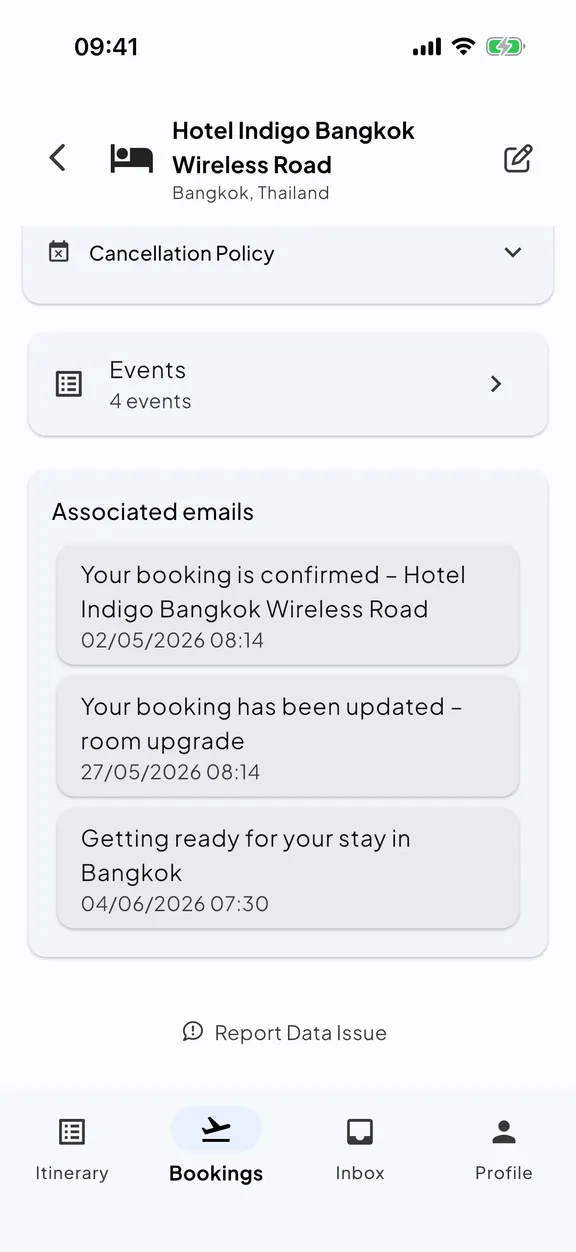
The notifications are deliberately quiet: a real retime, a cancellation, or a now-tight connection buzzes your phone; an equipment swap that changes nothing doesn’t. That ratio is the whole point. An itinerary that interrupts you only when it matters is one you’ll actually trust, and a wrong itinerary is exactly what you get when you stop trusting and stop checking.
(Worth saying: this is also why duplicate trips are such a recurring nomad complaint, and why the tool’s underlying data model matters so much. We dug into that in why every itinerary app breaks when you’re a nomad.)
Quick answers
Why does my saved itinerary show the wrong flight time?
How do I catch a flight schedule change before it strands me?
Will Skaoot notify me about every schedule change?
The bottom line
A flight schedule change isn’t rare and it isn’t your fault. What strands people is the gap between an itinerary that quietly went stale and a reality that moved on without it, a gap that stays invisible right up until the airport.
You can close that gap by hand: reconfirm at the source before every flight, check both legs of every connection, know your rights when a change is significant, and never travel on a record you haven’t verified against the airline’s live one. That works, as long as you never miss a run.
Or you can let something read every change in context and keep the one entry you look at correct on its own, so the next time the airline moves your flight, you find out the day it happens, not the day you fly.
Tired of holding your whole trip in your head?
Skaoot turns forwarded booking emails into one calm timeline of flights, stays, and more. It updates itself when plans change. Free for your first 5 bookings.
Related posts
How to organize your travel confirmation emails
Booking a trip is the easy part. Keeping the confirmation emails organized is the part nobody warns you about. Here are three honest ways to do it.
Why every itinerary app breaks when you're a nomad
Most itinerary apps assume a trip has a start, an end, and one destination. That works for a two-week holiday. It quietly falls apart the moment your travel becomes continuous.